V2.0 NOW LIVE Try Free →
Limited Pre-Release Pricing Lock in access before prices increase - Prices fixed for duration of subscription
Start Free 7-Day Trial

Precise. Proven. Automated.

Vector Platinum is a TradingView algo strategy built with Pine Script v6 for systematic futures and forex trading. Includes automated signals, walk-forward validation, and webhook integration.
Designed to generate consistent signals backed by logic, not hindsight.
PRE-RELEASE ACTIVE
44 SLOTS REMAINING
INITIATE 7-DAY TRIAL Full Access • Zero Commitment
🔒Secure
📚Full Docs
Cancel Anytime
Powered By TradingView
Vector Platinum TradingView Pine Script showcase
OVERVIEW

What Is Vector Platinum?

Vector Platinum is a rules-based TradingView strategy that produces systematic trade entries using seven configurable triggers and eighteen confluence filters across futures, forex, crypto, and stocks.

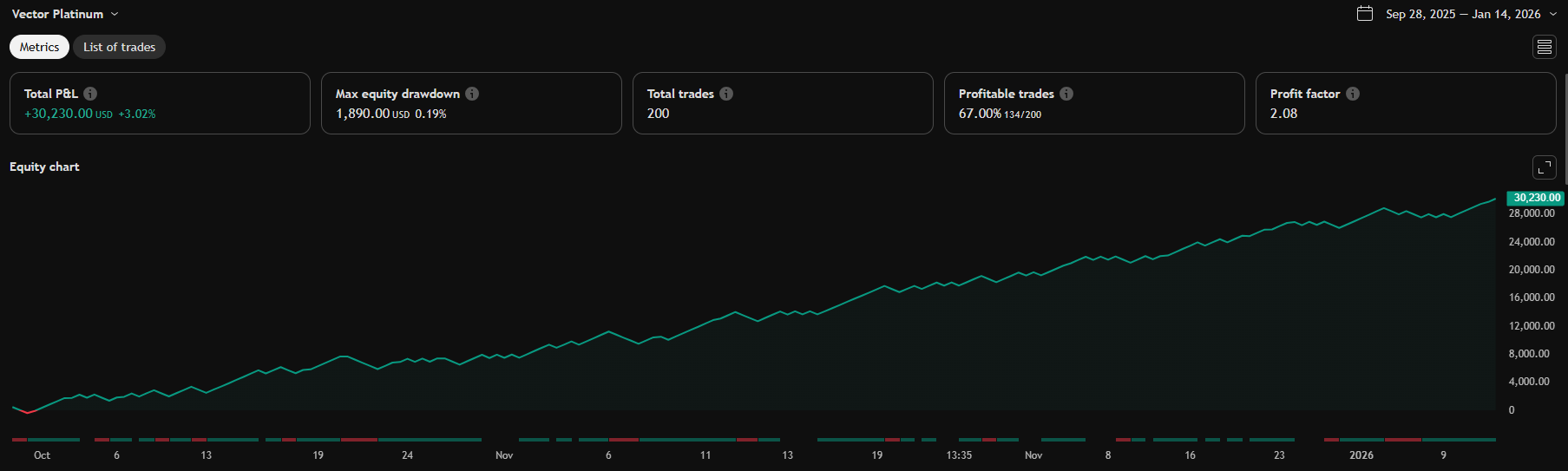
The system uses walk-forward / out-of-sample validation, and includes built-in risk management and optional webhook alerts. This framework prioritises reproducible logic and robustness over visually optimised backtest results.

GET STARTED

Setup Walkthrough

Up and running in 5–10 minutes.

Vector Platinum Setup Walkthrough thumbnail

Prefer to read? The full written setup guide covers every setting in detail.

Prefer to read?

View Full Written Setup Guide →Setup Guide →
CAPABILITIES

Built Different

Every component earns its place.

🎯

Multi-Confluence Entries

7 entry trigger types — including Keltner Channels, Bollinger Bands, Fibonacci levels, VWAP Reclaim, and PDH/PDL Touch — combined with 18 confluence filters to help identify higher-probability setups.

Precision Risk Control

3 stop-loss modes, customizable R:R ratios, auto breakeven, win-streak dynamic position sizing, and real-time prop firm drawdown monitoring with configurable dollar limits and automatic emergency close.

🔍

Professional Filters

HTF trend alignment, market regime detection, Supertrend filter, volume confirmation, S/R zone filtering with HTF S/R overlay, and session-based trading windows.

🤖

Full Automation

Webhook-ready JSON alerts for broker integration with configurable entry/exit templates.

💎

Real-Time Dashboard

20+ live metrics, rolling win rate, profit factor, live R:R tracking, and equity health monitoring — all directly on your chart.

🎯

Plug-and-Play Presets

7+ optimized presets for popular futures contracts (MES, MNQ, M2K, MGC, BTC) — continuously expanding. Deploy instantly with override toggles to fine-tune without losing the preset baseline.

SEE THE DIFFERENCE

Vector Platinum vs. The Alternatives

A purpose-built system versus the alternatives.

Feature Vector Platinum Manual Trading Generic Algo Scripts
Signal Generation✓ 7 automated triggers + confluence✗ Manual chart watching~ Single-indicator only
Entry Precision✓ High-probability confluence filtering~ Emotion-driven inconsistency~ Unvalidated quality
Multi-Timeframe Analysis✓ Built-in MTF confluence✗ Manual switching required✗ Single timeframe only
Walk-Forward Validation✓ OOS validated (no curve-fitting)✗ No systematic validation✗ Overfitted to history
Confluence Filters✓ 18 stackable filters~ Subjective guesswork✗ Minimal or none
Real-Time Alerts✓ TradingView native + webhooks✗ Must stay glued to charts~ Basic alerts only
Emotional Bias✓ 100% rule-based (zero emotion)✗ High emotional influence✓ Algorithmic (if coded well)
Backtesting✓ TradingView Max Bar Length✗ Time-consuming manual review~ Often curve-fitted
Setup Time✓ 5-10 minutesYears of skill developmentHours of trial & error
Investment$30/mo (was $49.99) / $250 Lifetime (was $450)Opportunity cost + screen time$0-500+ (hit or miss)
Support & Docs✓ Full docs + Discord community~ Books, courses, forums✗ Often none or minimal
Risk Management✓ Built-in TP/SL/BE logic~ Requires discipline~ Varies by script
24/7 Monitoring✓ Works while you sleep✗ Sleep = missed setups✓ If properly configured
EARLY ADOPTERS

First Impressions

What traders are saying

⭐⭐⭐⭐⭐

"The walk-forward validation tools alone are worth it. Top strategy that continues to produce results in a forward environment."

Beta TesterFutures Trader
⭐⭐⭐⭐⭐

"Quick Setup. Confluence filtering perfect for MES scalping. Looking forward to seeing the roadmap play out"

Beta TesterFutures Trader
⭐⭐⭐⭐⭐

"Best TradingView strategy I've used. The settings panel makes sense. Passed my prop evaluation in 4 days fully automated."

Early Access UserForex & Crypto Trader
STRATEGY IN ACTION

See It In Action

Real signals, real settings, real validation—everything you need to trade with confidence

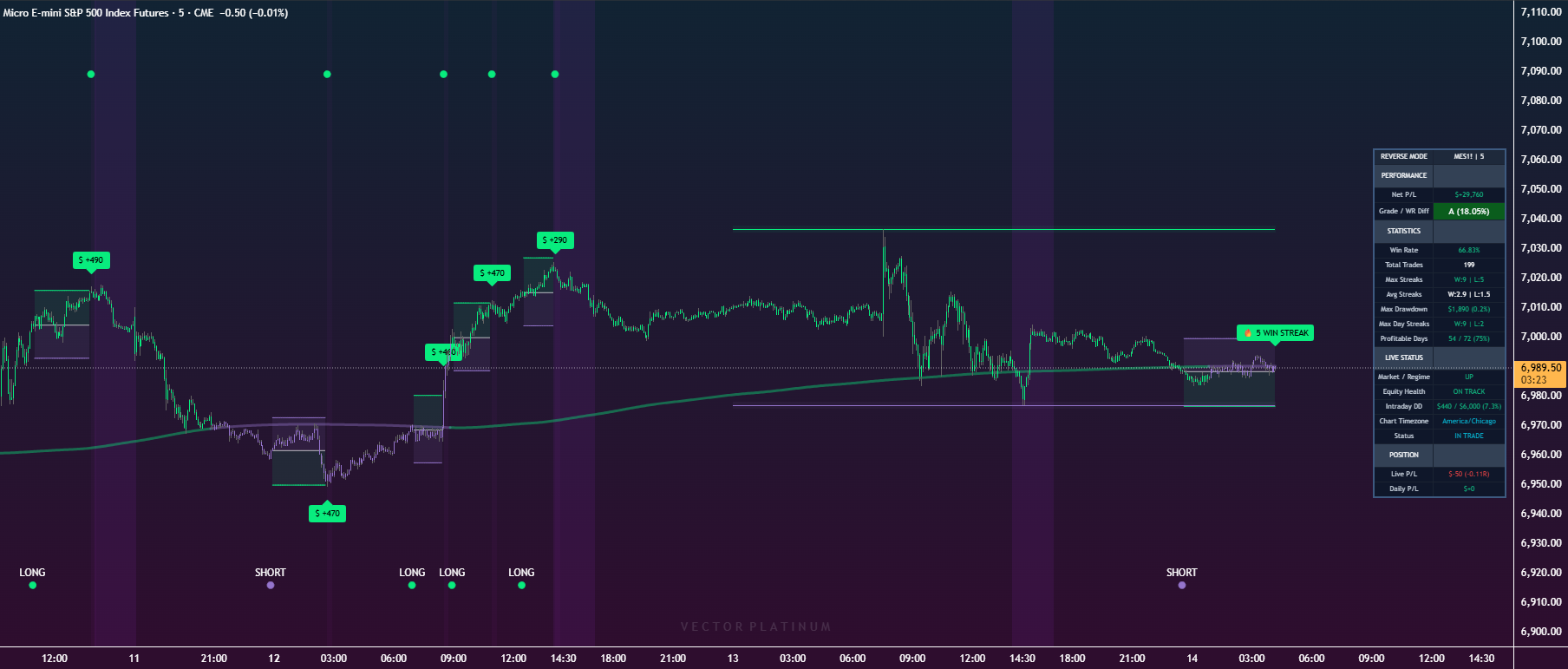
TradingView algo strategy signals MES futures

Precision Entry Signals

All entries and exits are generated mechanically using configurable logic and filters. No signals are manually adjusted, repainted, or optimized to look better after the fact.

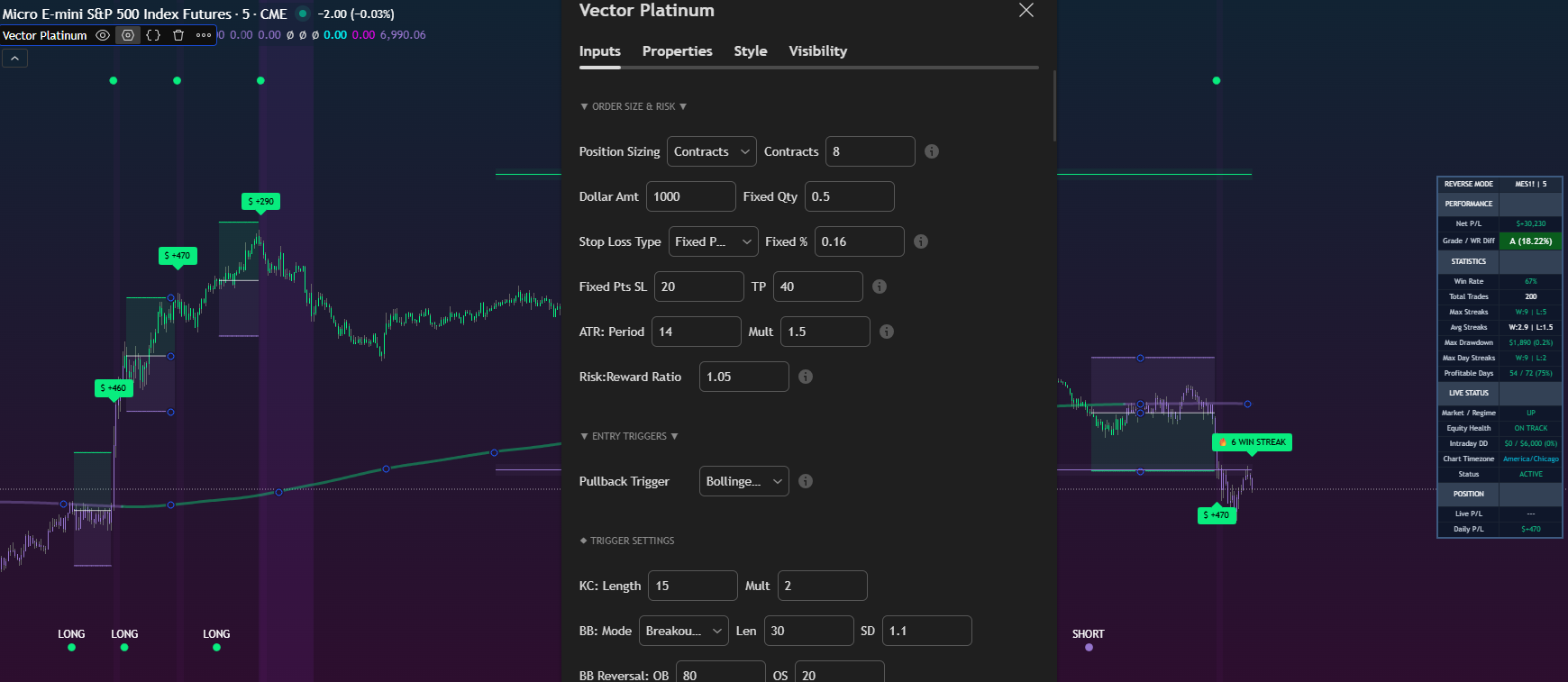
Automated TradingView strategy settings panel

Comprehensive Settings Panel

Full control over risk management, position sizing, and entry triggers

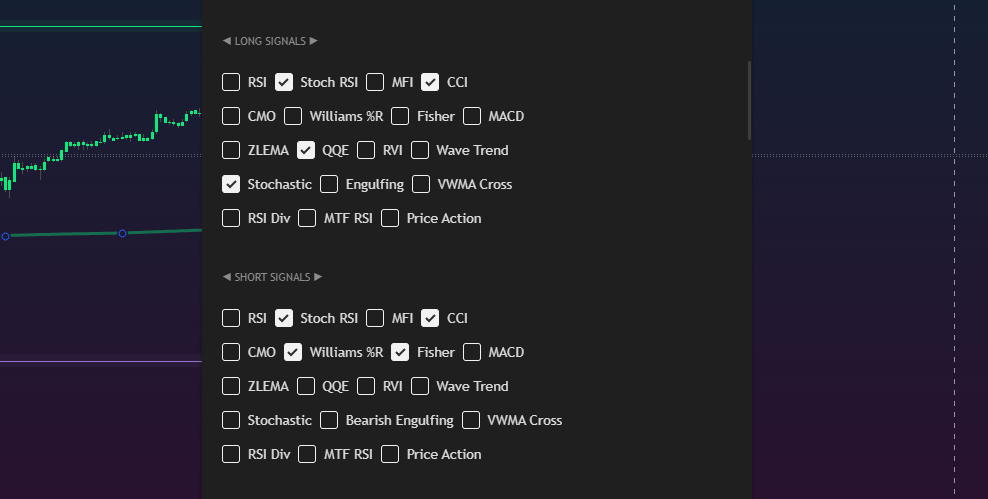
Pine Script confluence filters algorithmic trading

18 Confluence Filters

Stack multiple indicators for high-probability setups

GETTING STARTED

How It Works

From trial to live trading in four simple steps—no coding required

1

Start Free Trial

Get instant access to Vector Platinum. Sign up now for your 7-day trial.

2

Configure Settings

Choose your market, timeframe, and risk parameters through the streamlined settings panel.

3

Validate with OOS

Run Out-of-Sample testing to ensure your settings are robust, not overfitted.

4

Deploy & Trade

Go live manually or automate with webhooks. Monitor performance with real-time analytics.

Setup Resources
Docs & Setup Guide Join Discord

Initial setup, strategy config & troubleshooting guides

ROADMAP

Release Timeline

Pre-release pricing locks in all future updates. Your roadmap:

Live Now v2.0

Core Strategy Launch

Vector Platinum V2.0 pre-release launch

Q2 2026

Vector Gold (Flagship #2)

Trend-following powerhouse • Multi-timeframe bias • HTF Regime detection

Q3 2026

Indicator Suite + ORB Pro

Manual trading toolkit • Opening Range Breakout strategy • Session profiles • Volume delta

Q4 2026

Infrastructure Scale + Global Launch

Performance upgrades, global marketing expansion, and accelerated R&D for Vector Suite v2.0. Lifetime members shape the roadmap through exclusive beta testing.

INVESTMENT

Choose Your Plan

Start risk-free with our 7-day trial, or lock in lifetime access at early bird pricing

🎁 7-DAY FREE TRIAL

Monthly Access

🔥 40% OFF — LIMITED TIME $49.99/mo
$30.00

Per Month

Try FREE for 7 days, then $30/month
  • Complete PineScript v6 Strategy
  • 7 Pullback Triggers + 18 Indicators
  • Walk Forward Analysis Tools
  • Webhook Automation Templates
  • Discord Community Access
  • Setup Guides & Tutorials
  • Regular Updates
  • Cancel Anytime
Start Free Trial
🔥 EARLYBIRD LIFETIME

Lifetime Access

🔥 44% OFF — EARLY BIRD PRICE $450 one-time
$250.00

One-Time Payment

Save $200 vs full price — forever!
  • Complete PineScript v6 Strategy
  • 7 Pullback Triggers + 18 Indicators
  • Walk Forward Analysis Tools
  • Webhook Automation Templates
  • Discord Community Access
  • Setup Guides & Tutorials
  • Lifetime Updates Forever
  • Priority Support
Get Lifetime Access

⚡ Limited spots at this price

Pre-Release pricing locks forever—even as we expand our strategy suite

QUESTIONS

Frequently Asked Questions

Everything you need to know about Vector Platinum

What platform does Vector Platinum work on?+
Vector Platinum is built for TradingView using PineScript v6. You need an active TradingView account (free or paid) to use the strategy.
What markets and timeframes work best?+
Optimized for intraday futures trading (ES, MES, NQ, MNQ) on 5-minute timeframes. Also works on forex, crypto, and stocks. The 15-minute timeframe works well for swing trading.
Can I automate this with my broker?+
Yes! Vector Platinum includes webhook-ready JSON alert templates for broker integration. You can configure fully automated entry/exit execution.
What is Out-of-Sample validation?+
OOS testing splits your data into training and testing periods. You optimize on training data, then validate on hold-out periods the strategy has never seen. This reveals if your settings are robust or just curve-fitted.
Do I need a paid TradingView subscription?+
A TradingView Premium or higher subscription is recommended for accurate backtesting on 20,000 bars of data. Free accounts are limited to 10,000 bars which can significantly affect backtest results and strategy optimization.
Is this a "set-and-forget" trading bot?+
No. Vector Platinum is a strategy framework, not a money-printing machine. It requires proper market selection, risk management, and monitoring.
What's the difference between training and validation periods?+
Training periods are used to optimize your strategy settings, while validation (out-of-sample) periods test those settings on data the strategy has never seen. This reveals whether your settings are robust or just curve-fitted to historical data. Vector Platinum supports both repeating patterns and single date cutoff validation modes.
Can I use this on stocks and crypto, or just futures?+
Vector Platinum works across all asset classes including stocks, crypto, forex, and futures. While optimized for intraday futures trading on 5-minute charts, the strategy adapts to different instruments by adjusting ATR-based parameters and volatility thresholds automatically.
How do I know which confluence filters to enable?+
Start with 2-3 filters that align with your market bias—momentum oscillators (RSI, Stochastic) for reversal trading, or trend indicators (QQE, Fisher Transform, ARMI) for trend following. Use Walk Forward Analysis to test different combinations on out-of-sample data. More filters aren't always better; they reduce trade frequency and can cause over-optimization.
Does Vector Platinum repaint signals?+
No. Vector Platinum uses barstate.isconfirmed to ensure all signals finalize only after the bar closes, preventing repainting. This means signals in backtesting match what you'd see in live trading. All calculations are based on confirmed historical data, not future information.
How often should I update my strategy settings?+
Review settings quarterly or when market conditions significantly change (volatility regime shifts, trending to ranging markets). Use Walk Forward Analysis to validate any changes on out-of-sample data before going live. Avoid over-optimization by changing settings too frequently based on short-term results.
What's the difference between monthly and lifetime access?+
Monthly access costs $30/month (normally $49.99/mo) and can be cancelled anytime. Lifetime access is a one-time payment of $250 (normally $450) giving you permanent access with no recurring fees—saving you $200 vs the full price forever. Both include all features, updates, and community access.

×